
Practical Python
- Gowtham V

- Nov 19, 2021
- 22 min read
Updated: Jun 25, 2022
In this article, I have covered the following topics.
* Fundamentals of Python
* Writing a Python program
* Input and output
* Data Types
Install the code editor, we use code editor to write code. Now there are so many code editors, The one that I'm going to show in this article is PyCharm. This is one of the most popular code editors.
PyCharm : You can get it from the following link - https://www.jetbrains.com/pycharm/
PyCharm : PyCharm is an integrated development environment used in computer programming, specifically for the python language. It is developed by JetBrains.
IDE : An Integrated Development environment is a software application that provides comprehensive facilities to computer programmers for software development. An IDE normally consists of at-least a source code editor, build automation tools and a debugger.
Let's start with saving numbers to variables.
Amount = 10 (Assigning the value 10 to the variable amount)
tax = .06 (6 Percent)
total = amount + amount*tax
Print(total) --- Using Print function to get the results
Result = 106
Code with Terminal Result.

The print function is a built-in function in Python, print(total) : print - function name, total - argument. Passing the value we want to print, which is called argument.
Data Type Conversion Functions.
Converting a float to an integer.
amount = 10.6
print(amount)
Result : 10.6
Now will wrap the number in a call to the function.
amount = int(10.6)
print(amount)
Result : 10
Int - Integer function will try to convert 10.6 to an integer by chopping off the decimal part and provide the results in whole number.
If we want number in a call to the float function. Use float function which will try and convert to a decimal,
ex: amount = float(10)
print(amount)
Result : 10.0
String
Anything inside double or single quotes is considered text and is called string.
name = 'Gowtham'
print(name)
here the string 'Gowtham' is saved to the variable name.
Double quotes
store_name = "Gowtham's Store"
print(store_name)
Double quotes can be useful if a single quote is literally part of the string, Suppose if we use single quote,
store_name = 'Gowtham's Store'
print(store_name)
This would case an error because the second single quote would end the string and python wouldn't know what to do with the rest.
String concatenation
Hello = "Hello"
name = "Gowtham"
greeting = hello + " " + name
print(greeting)
Results : Hello Gowtham
** How can we customize this program for other names?
Let's ask the user for their name and print the results based on their input.
my_name = input("What's your name?"). Input function is a built-in function in Python. Using input, we're passing in a string. Which is a message to prompt the user for input.
The message gets printed on screen, The program waits for the user to input something and press enter.
When we enter the name that string is saved to the variable.
hello = "Hello"
name = input("What's your name? ")
greeting = hello + " " + name
print(greeting)
Results:
What's your name? Gowtham
Hello Gowtham
* Input() prints the statement, then waits for a value from the console.

Age Calculation.
Code
birth_year = input('Birth Year: ')
age = 2021 - int(birth_year)
print(age)
Results.
Birth Year: 1996
25
Overview of the above code:
Storing the input variable in birth_year field, and calculating the age based on the user input value.
* Ask a user their weight (In pounds), convert it to kilograms
weight_lbs = input('weight (lbs): ')
weight_kg = int(weight_lbs) * 0.45
print(weight_kg)
Results.
weight (lbs): 160
72.0
* Operator precedence
x = (2+3) * 10 - 3
print(x)
Results : 47
* If Conditions
is_hot = False
is_cold = False

if is_hot:
    print("It's a hot day")
    print("Drink Plenty of water")
elif is_cold:
    print("It's a cold day")
    print("Wear warm clothes")
else: print("It's a lovely day")

If both is_hot and is_cold is true it will pass both statements i.e if and elif, If both are false it will print else.
First we need to declare a variable is_hot and is_cold. Next we need to declare the if statements.
-----> If is_hot: (Any code that we write here will be executed if this condition is true, other wise it will be ingnored).

* Decisions In Program based on if conditions.
temperature = 75
forecast = "sunny"

if temperature < 80 and forecast != "rain":
    print("Go outside")
else:
    print("Stay inside!")
* To get the characters from the declared variables.
Strings are indexed as follows: 0,1,2,3,4 etc
COURSE = 'Python for Beginners'
another = COURSE[1:-1]
print(another)
Results : ython for Beginner (Index 1st number and excluding the last number from the course field).
* To calculate the price of a property based on the good credit.
price = 100000
has_good_credit = True

if has_good_credit:
    down_payment = 0.1 * price
else:
    down_payment = 0.2 * price
print(f"down payment: ${down_payment}")
Result : down payment: $10000.0
Explanation of the above code :
Define a variable to 100K next we need to tell the variable if this buyer has a good credit, So if good credit is true then 10% of the price of the property. Other wise the down payment will be 20 % of the price. Used placeholder or a hole for the down payment variables.
Placeholder : {}
The placeholder can be empty {}, or it can have a variable for e.g {name} , or it can have a number index e.g {0} , {1} etc. You can make use of String Formatting in Python inside placeholders that can help to add padding, center align, and also help with number formatting.
* List and Loops
A list in Python is a container that can store anything you want. you can have an empty list,
a list of strings, a list of numbers, and a list of mixed items like numbers and strings, and even a list of lists.
empty = []
# list_of_strings
acronyms = ['LOL', IDK', 'TBH']
numbers = [5,10,15,20]
#list of mixed items
anything = [5,'SDK',10.5]
lists = [['A','B','C],['D','E','F']]
In Python, the index numbering starts at 0. So if we want to get the first acronym in our list, We will type the name of the list, followed by square brackets and the index [0].
Ex: acronyms = ['LOL', 'IDK', 'SMH', 'TBH']
Index = 0, 1, 2, 3
I.E acronyms[0] will be 'LOL'
Creating a list and adding items
acronyms = [] ---- declaring empty list
and then add each item using the .append method.
acronyms.append('LOL')
We can also create a list with initial items. And add items as we need to
acronyms = ['LOL', 'IDK', 'SMH']
acronyms.append('BFN')
accronyms.append('IMHO')
print(acronyms)
Result : ['LOL', 'IDK', 'SMH','BFN','IMHO']
Removing Items:
acronyms = ['LOL', 'IDK', 'SMH','BFN']
acronyms.remove('BFN')
print(acronyms)
acronyms = ['LOL', 'IDK', 'SMH']
---------------------------------------------------------------------
Removing Items based on the index
acronyms = ['LOL', 'IDK', 'SMH','BFN']
acronyms.remove('BFN') or del acronyms[4]
print(acronyms)
acronyms = ['LOL', 'IDK', 'SMH']
* Check if exists in list.
if 1 in [1,2,3,4,5]:
    print('True')
Result : True
Explanation : 1 is the item you're checking, then the keyword In, then the list you're checking.
Acronyms :
acronyms = ['LOL','IDK','SMH','TBH']
word = 'BFN'

if word in acronyms:
    print(word + ' is in the list')
else:
    print(word + ' is not in the list')
Results : BFN is not in the list
For Loop: Looping Over Each Item in a list
acronyms = ['LOL','IDK','SMH','TBH']

for acronym in acronyms:
      print(acronym)
LOL
IDK
SMH
TBH
a = ["akdk","Kg","gg","ggfg"]
a.append("aaa")
print(a)
Results : ['akdk', 'Kg', 'gg', 'ggfg', 'aaa']
for i in range(1,10): print(i)
Results
1
2
3
4
5
6
7
8
9
expenses = [10.20, 80]
sum = 0

for x in expenses:
    sum = sum + x

print("You Spent $", sum)
Results : You Spent $ 90.2
Functions : Functions are like mini-programs that complete a specific task. We might not know how these work, but they give the expected results.
Python is perfectly suited to do basic calculations. Apart from addition, subtraction, multiplication and division, there is also support for more advanced operations such as:
Exponentiation: **. This operator raises the number to its left to the power of the number to its right. For example 4**2 will give 16.
Modulo: %. This operator returns the remainder of the division of the number to the left by the number on its right. For example 18 % 7 equals 4.
The code in the script gives some examples.
Suppose you have $200, which you can invest with a 10% return each year. After one year, it's 100×1.1=110 dollars, and after two years it's 200×1.1×1.1=121. Add code to calculate how much money you end up with after 7 years, and print the result.

Variable Assignment
In Python, a variable allows you to refer to a value with a name. To create a variable use =, like this example:
x = 5You can now use the name of this variable, x, instead of the actual value, 5.
Remember, = in Python means assignment, it doesn't test equality!
Question : 1
Create a variable savings with the value 100.
Check out this variable by typing print(savings) in the script.
# Create a variable savings savings = 100 # Print out savings print(savings)

Calculations with variables
Remember how you calculated the money you ended up with after 7 years of investing $200? You did something like this: 200 * 1.1 ** 7 Instead of calculating with the actual values, you can use variables instead. The savings variable you've created in the previous exercise represents the $200 you started with. It's up to you to create a new variable to represent 1.1 and then redo the calculations!
Instructions
Create a variable growth_multiplier, equal to 1.1.
Create a variable, result, equal to the amount of money you saved after 7 years.
Print out the value of result.
# Create a variable savings savings = 100 # Create a variable growth_multiplier growth_multiplier = 1.1 # Calculate result result = savings * growth_multiplier ** 7 # Print out result print(result)
Ans:

Other variable types
In the previous exercise, you worked with two Python data types:
int, or integer: a number without a fractional part. savings, with the value 100, is an example of an integer.
float, or floating point: a number that has both an integer and fractional part, separated by a point. growth_multiplier, with the value 1.1, is an example of a float.
Next to numerical data types, there are two other very common data types:
str, or string: a type to represent text. You can use single or double quotes to build a string.
bool, or boolean: a type to represent logical values. Can only be True or False (the capitalization is important!).
Instructions
Create a new string, desc, with the value "compound interest".
Create a new boolean, profitable, with the value True.

Guess the type
To find out the type of a value or a variable that refers to that value, you can use the type() function. Suppose you've defined a variable a, but you forgot the type of this variable. To determine the type of a, simply execute: type(a) We already went ahead and created three variables: a, b and c. You can use the IPython shell to discover their type. Which of the following options is correct?
Ans :
# Create a variable desc desc = "Compound interest" # Create a variable profitable profitable = True
In [1]:type(a), type(b), type(c)
Out[1]:(float, str, bool)
Operations with other types
Hugo mentioned that different types behave differently in Python. When you sum two strings, for example, you'll get different behavior than when you sum two integers or two booleans. In the script some variables with different types have already been created. It's up to you to use them.
Instructions
Calculate the product of savings and growth_multiplier. Store the result in year1.
What do you think the resulting type will be? Find out by printing out the type of year1.
Calculate the sum of desc and desc and store the result in a new variable doubledesc.
Print out doubledesc. Did you expect this?
savings = 100 growth_multiplier = 1.1 desc = "compound interest" # Assign product of savings and growth_multiplier to year1 year1 = savings * growth_multiplier # Print the type of year1 print(type(year1)) # Assign sum of desc and desc to doubledesc doubledesc = desc + desc # Print out doubledesc print(doubledesc)

Type conversion
Using the + operator to paste together two strings can be very useful in building custom messages. Suppose, for example, that you've calculated the return of your investment and want to summarize the results in a string. Assuming the integer savings and float result are defined, you can try something like this: print("I started with $" + savings + " and now have $" + result + ". Awesome!") This will not work, though, as you cannot simply sum strings and integers/floats. To fix the error, you'll need to explicitly convert the types of your variables. More specifically, you'll need str(), to convert a value into a string. str(savings), for example, will convert the integer savings to a string. Similar functions such as int(), float() and bool() will help you convert Python values into any type.
Instructions
Hit Run Code to run the code. Try to understand the error message.
Fix the code such that the printout runs without errors; use the function str() to convert the variables to strings.
Convert the variable pi_string to a float and store this float as a new variable, pi_float.
# Definition of savings and result savings = 100 result = 100 * 1.10 ** 7 # Fix the printout print("I started with $" + str(savings) + " and now have $" + str(result) + ". Awesome!") # Definition of pi_string pi_string = "3.1415926" # Convert pi_string into float: pi_float pi_float = float(pi_string)
Create a list
As opposed to int, bool etc., a list is a compound data type; you can group values together: a = "is" b = "nice" my_list = ["my", "list", a, b] After measuring the height of your family, you decide to collect some information on the house you're living in. The areas of the different parts of your house are stored in separate variables for now, as shown in the script.
Instructions :
Create a list, areas, that contains the area of the hallway (hall), kitchen (kit), living room (liv), bedroom (bed) and bathroom (bath), in this order. Use the predefined variables.
Print areas with the print() function.
# area variables (in square meters) hall = 11.25 kit = 18.0 liv = 20.0 bed = 10.75 bath = 9.50 # Create list areas areas = (hall,kit,liv,bed,bath) # Print areas print(areas)
Code for list
# Area variables (in square meters) hall = 11.25 kit = 18.0 liv = 20.0 bed = 10.75 bath = 9.50 # Create list areas areas = [hall, kit, liv, bed, bath] # Print areas print(areas)
Result

Create list with different types
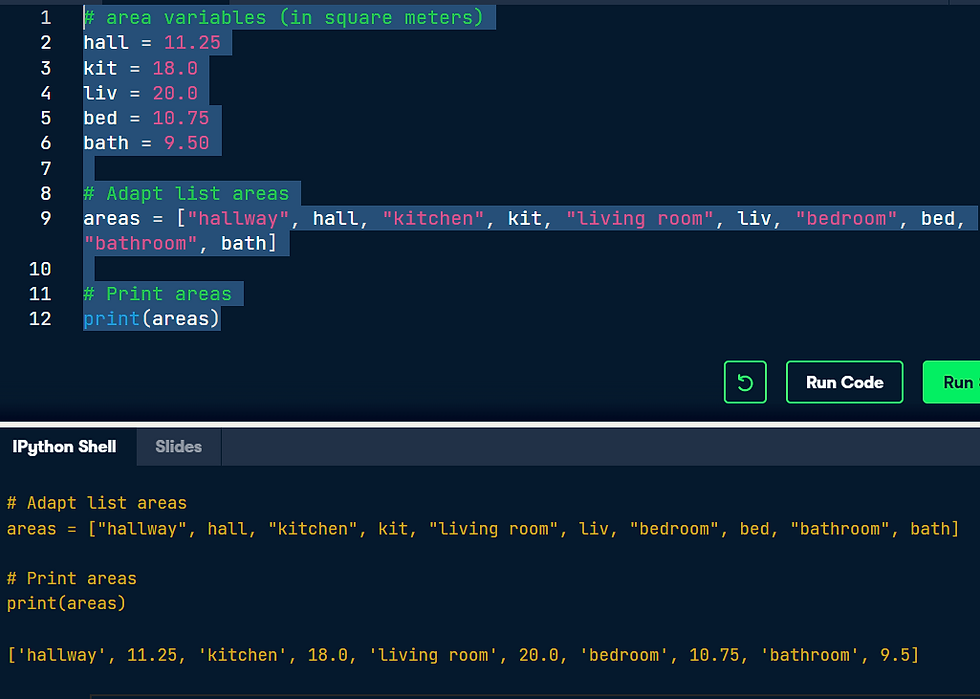
A list can contain any Python type. Although it's not really common, a list can also contain a mix of Python types including strings, floats, booleans, etc. The printout of the previous exercise wasn't really satisfying. It's just a list of numbers representing the areas, but you can't tell which area corresponds to which part of your house. The code in the editor is the start of a solution. For some of the areas, the name of the corresponding room is already placed in front. Pay attention here! "bathroom" is a string, while bath is a variable that represents the float 9.50 you specified earlier.
Instructions
Finish the code that creates the areas list. Build the list so that the list first contains the name of each room as a string and then its area. In other words, add the strings "hallway", "kitchen" and "bedroom" at the appropriate locations.
Print areas again; is the printout more informative this time?
Code:
# area variables (in square meters) hall = 11.25 kit = 18.0 liv = 20.0 bed = 10.75 bath = 9.50 # Adapt list areas areas = ["hallway", hall, "kitchen", kit, "living room", liv, "bedroom", bed, "bathroom", bath] # Print areas print(areas)
List of lists
As a data scientist, you'll often be dealing with a lot of data, and it will make sense to group some of this data. Instead of creating a flat list containing strings and floats, representing the names and areas of the rooms in your house, you can create a list of lists. The script in the editor can already give you an idea. Don't get confused here: "hallway" is a string, while hall is a variable that represents the float 11.25 you specified earlier.
Finish the list of lists so that it also contains the bedroom and bathroom data. Make sure you enter these in order!
Print out house; does this way of structuring your data make more sense?
Print out the type of house. Are you still dealing with a list?
CODE:
# area variables (in square meters) hall = 11.25 kit = 18.0 liv = 20.0 bed = 10.75 bath = 9.50 # house information as list of lists house = [["hallway", hall], ["kitchen", kit], ["living room", liv], ["bedroom", bed],["bathroom", bath]] # Print out house print(house) # Print out the type of house print(type(house))
Answer :

Subset and conquer
Subsetting Python lists is a piece of cake. Take the code sample below, which creates a list x and then selects "b" from it. Remember that this is the second element, so it has index 1. You can also use negative indexing. x = ["a", "b", "c", "d"]
x[1]
x[-3] # same result! Remember the areas list from before, containing both strings and floats? Its definition is already in the script. Can you add the correct code to do some Python subsetting?
Instructions:
Print out the second element from the areas list (it has the value 11.25).
Subset and print out the last element of areas, being 9.50. Using a negative index makes sense here!
Select the number representing the area of the living room (20.0) and print it out.

After you've extracted values from a list, you can use them to perform additional calculations. Take this example, where the second and fourth element of a list x are extracted. The strings that result are pasted together using the + operator:
x = ["a", "b", "c", "d"]
print(x[1] + x[3])
Instructions * Using a combination of list subsetting and variable assignment, create a new variable, eat_sleep_area, that contains the sum of the area of the kitchen and the area of the bedroom.
* Print the new variable eat_sleep_area.

Slicing and dicing
Selecting single values from a list is just one part of the story. It's also possible to slice your list, which means selecting multiple elements from your list. Use the following syntax: my_list[start:end] The start index will be included, while the end index is not. The code sample below shows an example. A list with "b" and "c", corresponding to indexes 1 and 2, are selected from a list x: x = ["a", "b", "c", "d"]
x[1:3] The elements with index 1 and 2 are included, while the element with index 3 is not.

Slicing and dicing (2)
In the video, Hugo first discussed the syntax where you specify both where to begin and end the slice of your list: my_list[begin:end] However, it's also possible not to specify these indexes. If you don't specify the begin index, Python figures out that you want to start your slice at the beginning of your list. If you don't specify the end index, the slice will go all the way to the last element of your list. To experiment with this, try the following commands in the IPython Shell: x = ["a", "b", "c", "d"]
x[:2]
x[2:]
x[:]
Instructions
Create downstairs again, as the first 6 elements of areas. This time, simplify the slicing by omitting the begin index.
Create upstairs again, as the last 4 elements of areas. This time, simplify the slicing by omitting the end index.

Replace list elements
Replacing list elements is pretty easy. Simply subset the list and assign new values to the subset. You can select single elements or you can change entire list slices at once. Use the IPython Shell to experiment with the commands below. Can you tell what's happening and why? x = ["a", "b", "c", "d"] x[1] = "r" x[2:] = ["s", "t"] For this and the following exercises, you'll continue working on the areas list that contains the names and areas of different rooms in a house.
Instructions:
Update the area of the bathroom area to be 10.50 square meters instead of 9.50.
Make the areas list more trendy! Change "living room" to "chill zone".

Extend a list
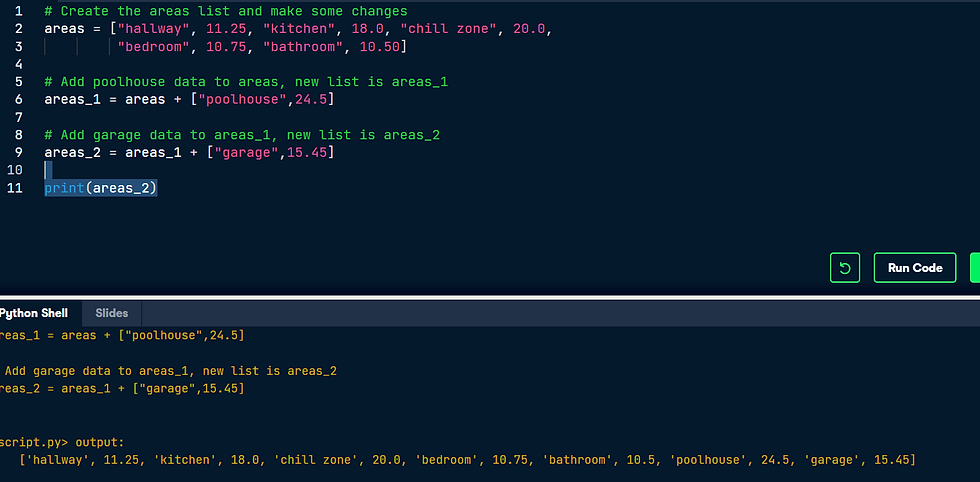
If you can change elements in a list, you sure want to be able to add elements to it, right? You can use the + operator: x = ["a", "b", "c", "d"] y = x + ["e", "f"] You just won the lottery, awesome! You decide to build a poolhouse and a garage. Can you add the information to the areas list?
Instruction
Use the + operator to paste the list ["poolhouse", 24.5] to the end of the areas list. Store the resulting list as areas_1.
Further extend areas_1 by adding data on your garage. Add the string "garage" and float 15.45. Name the resulting list areas_2.
Delete list elements
Finally, you can also remove elements from your list. You can do this with the del statement: x = ["a", "b", "c", "d"] del(x[1]) Pay attention here: as soon as you remove an element from a list, the indexes of the elements that come after the deleted element all change! The updated and extended version of areas that you've built in the previous exercises is coded below. You can copy and paste this into the IPython Shell to play around with the result. areas = ["hallway", 11.25, "kitchen", 18.0, "chill zone", 20.0, "bedroom", 10.75, "bathroom", 10.50, "poolhouse", 24.5, "garage", 15.45] There was a mistake! The amount you won with the lottery is not that big after all and it looks like the poolhouse isn't going to happen. You decide to remove the corresponding string and float from the areas list. The ; sign is used to place commands on the same line. The following two code chunks are equivalent: # Same line command1; command2 # Separate lines command1 command2
Which of the code chunks will do the job for us?
Which of the code chunks will do the job for us?
areas = ["hallway", 11.25, "kitchen", 18.0, "chill zone", 20.0, "bedroom", 10.75, "bathroom", 10.50,"poolhouse",24.5,"garage",15.45]
Ans : del(areas[-4:-2])
Inner workings of lists
At the end of the video, Hugo explained how Python lists work behind the scenes. In this exercise you'll get some hands-on experience with this. The Python code in the script already creates a list with the name areas and a copy named areas_copy. Next, the first element in the areas_copy list is changed and the areas list is printed out. If you hit Run Code you'll see that, although you've changed areas_copy, the change also takes effect in the areas list. That's because areas and areas_copy point to the same list. If you want to prevent changes in areas_copy from also taking effect in areas, you'll have to do a more explicit copy of the areas list. You can do this with list() or by using [:].
Instructions:
Change the second command, that creates the variable areas_copy, such that areas_copy is an explicit copy of areas. After your edit, changes made to areas_copy shouldn't affect areas. Submit the answer to check this.

Familiar functions
Out of the box, Python offers a bunch of built-in functions to make your life as a data scientist easier. You already know two such functions: print() and type(). You've also used the functions str(), int(), bool() and float() to switch between data types. These are built-in functions as well. Calling a function is easy. To get the type of 3.0 and store the output as a new variable, result, you can use the following: result = type(3.0) The general recipe for calling functions and saving the result to a variable is thus: output = function_name(input)
Instructions
Use print() in combination with type() to print out the type of var1.
Use len() to get the length of the list var1. Wrap it in a print() call to directly print it out.
Use int() to convert var2 to an integer. Store the output as out2.

Help!
Maybe you already know the name of a Python function, but you still have to figure out how to use it. Ironically, you have to ask for information about a function with another function: help(). In IPython specifically, you can also use ? before the function name. To get help on the max() function, for example, you can use one of these calls: help(max) ?max Use the Shell to open up the documentation on complex(). Which of the following statements is true?
complex() takes two arguments: real and imag. real is a required argument, imag is an optional argument.
Multiple arguments
In the previous exercise, the square brackets around imag in the documentation showed us that the imag argument is optional. But Python also uses a different way to tell users about arguments being optional. Have a look at the documentation of sorted() by typing help(sorted) in the IPython Shell. You'll see that sorted() takes three arguments: iterable, key and reverse. key=None means that if you don't specify the key argument, it will be None. reverse=False means that if you don't specify the reverse argument, it will be False. In this exercise, you'll only have to specify iterable and reverse, not key. The first input you pass to sorted() will be matched to the iterable argument, but what about the second input? To tell Python you want to specify reverse without changing anything about key, you can use =: sorted(___, reverse = ___) Two lists have been created for you in the editor. Can you paste them together and sort them in descending order? Note: For now, we can understand an iterable as being any collection of objects, e.g. a List.
Use + to merge the contents of first and second into a new list: full.
Call sorted() on full and specify the reverse argument to be True. Save the sorted list as full_sorted.
Finish off by printing out full_sorted.

String Methods
Strings come with a bunch of methods. Follow the instructions closely to discover some of them. If you want to discover them in more detail, you can always type help(str) in the IPython Shell. A string place has already been created for you to experiment with.
Instructions:
Use the upper() method on place and store the result in place_up. Use the syntax for calling methods that you learned in the previous video.
Print out place and place_up. Did both change?
Print out the number of o's on the variable place by calling count() on place and passing the letter 'o' as an input to the method. We're talking about the variable place, not the word "place"!

List Methods
Strings are not the only Python types that have methods associated with them. Lists, floats, integers and booleans are also types that come packaged with a bunch of useful methods. In this exercise, you'll be experimenting with:
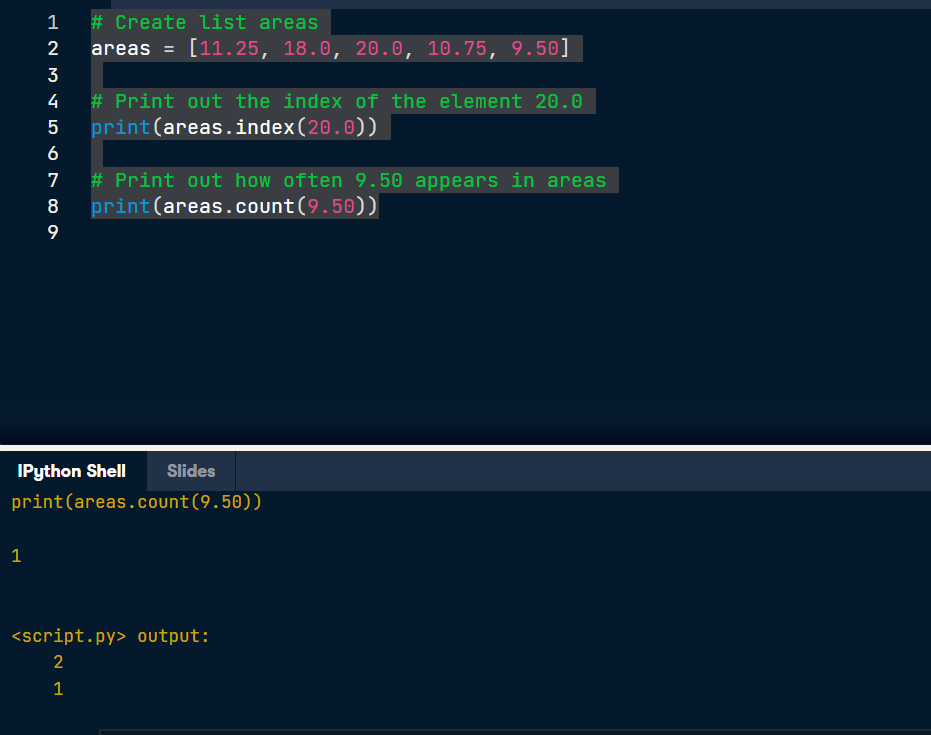
index(), to get the index of the first element of a list that matches its input and
count(), to get the number of times an element appears in a list.
You'll be working on the list with the area of different parts of a house: areas.
Instructions:
Use the index() method to get the index of the element in areas that is equal to 20.0. Print out this index.
Call count() on areas to find out how many times 9.50 appears in the list. Again, simply print out this number.
List Methods (2)
Most list methods will change the list they're called on. Examples are:
append(), that adds an element to the list it is called on,
remove(), that removes the first element of a list that matches the input, and
reverse(), that reverses the order of the elements in the list it is called on.
You'll be working on the list with the area of different parts of the house: areas.
Instructions:
Use append() twice to add the size of the poolhouse and the garage again: 24.5 and 15.45, respectively. Make sure to add them in this order.
Print out areas
Use the reverse() method to reverse the order of the elements in areas.
Print out areas once more.

Import package
As a data scientist, some notions of geometry never hurt. Let's refresh some of the basics. For a fancy clustering algorithm, you want to find the circumference, C, and area, A, of a circle. When the radius of the circle is r, you can calculate C and A as: C=2πrA=πr2 To use the constant pi, you'll need the math package. A variable r is already coded in the script. Fill in the code to calculate C and A and see how the print() functions create some nice printouts.
Instructions:
Import the math package. Now you can access the constant pi with math.pi.
Calculate the circumference of the circle and store it in C.
Calculate the area of the circle and store it in A.

Selective import
General imports, like import math, make all functionality from the math package available to you. However, if you decide to only use a specific part of a package, you can always make your import more selective: from math import pi Let's say the Moon's orbit around planet Earth is a perfect circle, with a radius r (in km) that is defined in the script.
Instruction:
Perform a selective import from the math package where you only import the radians function.
Calculate the distance travelled by the Moon over 12 degrees of its orbit. Assign the result to dist. You can calculate this as r * phi, where r is the radius and phi is the angle in radians. To convert an angle in degrees to an angle in radians, use the radians() function, which you just imported.
Print out dist.

Lists Recap
* Powerful
* Collection of values.
* Hold different types.
* Change, add, remove.
Problem with Lists.
Mathematical operations over collections.
Speed.
ex: if we declare a list of weight and height and tried to calculate BMI of it.
weight/height ** 2
if we execute the above statement python throws an error. Because it has no idea how to do calculations on lists.
Hence the most elegant solution is to use NumPy, or Numeric Python.
It's a python package that, among others, provides a alternative to the regular python list: The Numpy array.
-----------------------------------------------------------------------------------------------------------------------------------------
First NumPy Array.
An array is a collection of elements of the same type placed in contiguous memory locations that can be individually referenced by using an index to a unique identifier.
Solutions: NumPy
* Numeric Python
* Alternative to Python list: Numpy array.
* Calculations over entire arrays.
* Easy and Fast.
Syntax to import numpy
NumPy
import numpy as np
---------------------------------------------------------------------------------------------------------------------------------------
* NumPy Remarks
python_list = [1,2,3]
numpy_array = np.array([1,2,3])
--> python_list + python_list
ans : [1,2,3,1,2,3]
here the list of elements are pasted together, generating a list with 6 elements.
--> numpy_array + numpy_array
Ans : array([2,4,6])
here it is added the values on elements wise.
---------------------------------------------------------------------------------------------------------------------------------------
NumPy Subsetting
bmi
* If you want to get elements from your array, for example you can use square brackets.
array([21.85,20.91,21.90,24.90,22.48])
* now if you want to get the bmi of second person.
syntax : bmi[1]
Ans : 20.9
bmi > 23
array([False, False, False, True, False])
the above result is a NumPy array containing booleans, True if the corresponding bmi is above 23, False if it's below.
bmi[bmi > 23]
Ans : array([24.90])
--------------------------------------------------------------------------------------------------------------------------------------- 1. In this chapter, we're going to dive into the world of baseball. Along the way, you'll get comfortable with the basics of numpy, a powerful package to do data science.
A list baseball has already been defined in the Python script, representing the height of some baseball players in centimeters. Can you add some code there to create a numpy array from it?
Import the numpy package as np, so that you can refer to numpy with np.
Use np.array() to create a numpy array from baseball. Name this array np_baseball.
Print out the type of np_baseball to check that you got it right.

* Baseball players' height
You are a huge baseball fan. You decide to call the MLB (Major League Baseball) and ask around for some more statistics on the height of the main players. They pass along data on more than a thousand players, which is stored as a regular Python list: height_in. The height is expressed in inches. Can you make a numpy array out of it and convert the units to meters? height_in is already available and the numpy package is loaded, so you can start straight away (Source: stat.ucla.edu).
Create a numpy array from height_in. Name this new array np_height_in.
Print np_height_in.
Multiply np_height_in with 0.0254 to convert all height measurements from inches to meters. Store the new values in a new array, np_height_m.
Print out np_height_m and check if the output makes sense.

Baseball player's BMI
The MLB also offers to let you analyze their weight data. Again, both are available as regular Python lists: height_in and weight_lb. height_in is in inches and weight_lb is in pounds. It's now possible to calculate the BMI of each baseball player. Python code to convert height_in to a numpy array with the correct units is already available in the workspace. Follow the instructions step by step and finish the game!
Create a numpy array from the weight_lb list with the correct units. Multiply by 0.453592 to go from pounds to kilograms. Store the resulting numpy array as np_weight_kg.
Use np_height_m and np_weight_kg to calculate the BMI of each player. Use the following equation:BMI=weight(kg)height(m)2Save the resulting numpy array as bmi.
Print out bmi.

Lightweight baseball players
To subset both regular Python lists and numpy arrays, you can use square brackets:
x = [4 , 9 , 6, 3, 1] x[1] import numpy as np y = np.array(x) y[1]
For numpy specifically, you can also use boolean numpy arrays:
high = y > 5 y[high]
The code that calculates the BMI of all baseball players is already included. Follow the instructions and reveal interesting things from the data!
Instructions:
Create a boolean numpy array: the element of the array should be True if the corresponding baseball player's BMI is below 21. You can use the < operator for this. Name the array light.
Print the array light.
Print out a numpy array with the BMIs of all baseball players whose BMI is below 21. Use light inside square brackets to do a selection on the bmi array.

Subsetting NumPy Arrays
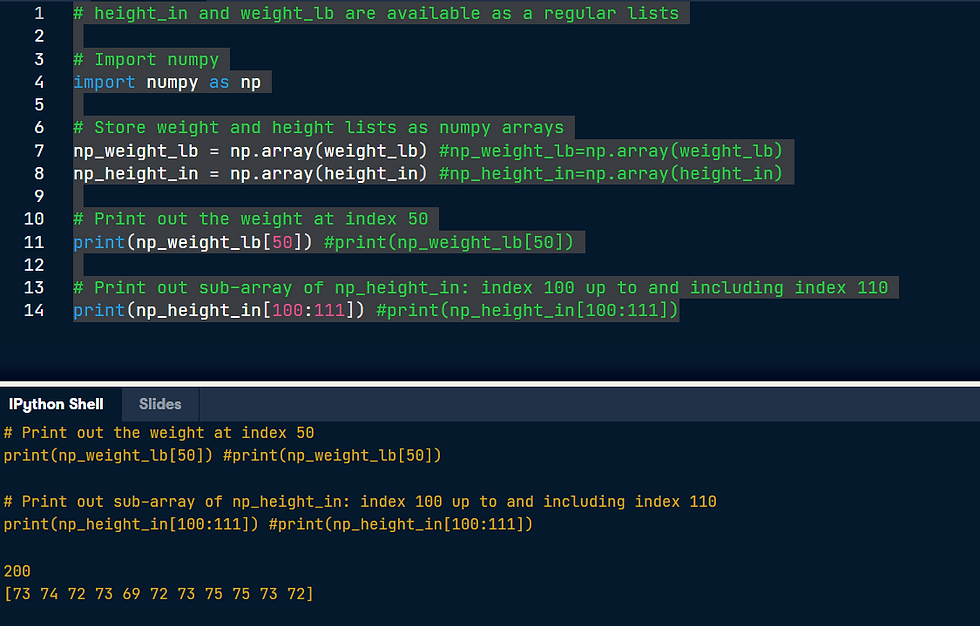
You've seen it with your own eyes: Python lists and numpy arrays sometimes behave differently. Luckily, there are still certainties in this world. For example, subsetting (using the square bracket notation on lists or arrays) works exactly the same. To see this for yourself, try the following lines of code in the IPython Shell: x = ["a", "b", "c"] x[1] np_x = np.array(x) np_x[1] The script in the editor already contains code that imports numpy as np, and stores both the height and weight of the MLB players as numpy arrays. Instructions:
Subset np_weight_lb by printing out the element at index 50.
Print out a sub-array of np_height_in that contains the elements at index 100 up to and including index 110.
Run CodeSubmit Answer
IPython Shell
Slides
# area variables (in square meters) hall = 11.25 kit = 18.0 liv = 20.0 bed = 10.75 bath = 9.50 # Create list areas areas = (hall,kit,liv,bed,bath) # Print areas print(areas) (11.25, 18.0, 20.0, 10.75, 9.5)
* Building Your First Python Analytics Solution
Data Science Project Cycle Overview.
Data > Extract > Organize > Analyze + Model > Present > Value / Insights.
Why Python for data science?
Language : Easy Intuitive
Packages : Tools & Libraries.
Community : Active community
Scalability : Fast
Production : Python Based Application stack.
Continued.
Python Library link : https://docs.python.org/3/library/
Exploratory Data Analysis
-> Basic Structure
-> Summary Statistics
-> Distributions
-> Grouping
-> Crosstabls
-> Pivots
Import Data
->NumPy
-> Pandas
* NumPy
> Fundamental tool for scientific computing.
> Very efficient array operations
> Work on multi-dimensional arrays and matrices
> High level mathematical functions
* Pandas
Built on top of Numpy. It also provides data structure and operations on tabular data (pandas dataframe).
A typical real-word data set looks like a spreadsheet, having a tabular structure with bunch of rows and columns. So you can think rows as observation, while each column represents a feature or attribute. And moreover, each column or feature can be of a different data type.

* Pandas can help you to deal with such situations very easily and efficiently.
* Data visualization using Matplotlib.
* Exploratory Data Analysis.
Basic Structure
How many rows or observations?
How many columns or features?
Column data types?
Explore head or tail?
In next chapter, will cover more topics on the basics of python and Importing python modules.



Comments