
SQL - Intermediate to Complex Queries
- Gowtham V

- Jun 4, 2022
- 7 min read
Updated: Sep 20, 2022
Q1. From the weather table, fetch all the records when London had extremely cold temperature for 3 consecutive days or more.
Approach : First using a sub query identify all the records where the temperature was very cold and then use a main query to fetch only the records returned as very cold from the sub query. You will not only need to compare the records following the current row but also need to compare the records preceding the current row. And may also need to compare rows preceding and following the current row. Identify a window function which can do this comparison pretty easily.
Table Creation and inserting values.
create table weather
(
id int,
city varchar(50),
temperature int,
day date
);
delete from weather;
insert into weather values
(1, 'London', -1, to_date('2021-01-01','yyyy-mm-dd')),
(2, 'London', -2, to_date('2021-01-02','yyyy-mm-dd')),
(3, 'London', 4, to_date('2021-01-03','yyyy-mm-dd')),
(4, 'London', 1, to_date('2021-01-04','yyyy-mm-dd')),
(5, 'London', -2, to_date('2021-01-05','yyyy-mm-dd')),
(6, 'London', -5, to_date('2021-01-06','yyyy-mm-dd')),
(7, 'London', -7, to_date('2021-01-07','yyyy-mm-dd')),
(8, 'London', 5, to_date('2021-01-08','yyyy-mm-dd'));
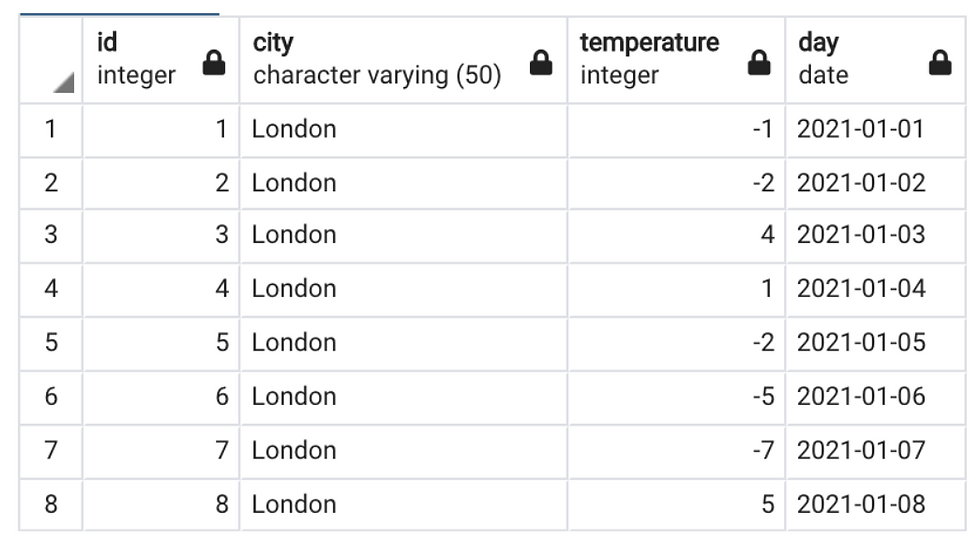
Query :
With t1 as (
Select *, row_number() over(order by id) as rn, id - (row_number() over(order by id)) as difference from weather where temperature < 0),
t2 as (Select *, count(*) over(partition by difference ) as no_of_records from t1)
Select * from t2 where no_of_records >= 2
Query Explanation :
With t1 as (Select *, row_number() over(order by id) as rn, id - (row_number() over(order by id)) as difference from weather where temperature < 0), ----------> The following temp table creates a new values row number and the unique id will get subtracted against row_number this will provides us the consecutive days where temperature is less than 0.
Example:
id (1) - row_number (1) = 0
id (2) - row_number(2) = 0

t2 as (Select *, count(*) over(partition by difference ) as no_of_records from t1)
Select * from t2 where no_of_records >= 2 ---------> The second part of the temp table partition the difference column based on the count analytical function.

Q2. From the vw_weather table, fetch all the records when London had extremely cold temperature for 3 consecutive days or more. (Here we have only 2 columns in the initial table).
(VW_Weather Plain table)

Final Results.

Main Query :
With w as (Select *, row_number() over() as id from vw_weather),
t1 as (Select *, row_number() over(order by id) as rn, id - (row_number() over(order by id)) as difference from w where temperature <0),
t2 as (Select *, count(*) over(partition by difference) as no_of_records from t1)
Select * from t2
-------------------------------------------------------------------------------------------------------------------------------
Query Explanation :
With w as (Select *, row_number() over() as id from vw_weather), ----> First we created a temp table to add id column. The ID column is derived the row_number function.
t1 as (Select *, row_number() over(order by id) as rn, id - (row_number() over(order by id)) as difference from w where temperature <0), ------> The following temp table creates a new values row number and the unique id will get subtracted against row_number this will provides us the consecutive days where temperature is less than 0.
t2 as (Select *, count(*) over(partition by difference) as no_of_records from t1) -----> The second part of the temp table partition the difference column based on the count analytical function.
Select * from t2
Example:
id (1) - row_number (1) = 0
id (2) - row_number(2) = 0
t2 as (Select *, count(*) over(partition by difference) as no_of_records from t1)
Select * from t2
------------------------------------------------------------------------------------------------------------------------------------
Query logic based on data field

Final Query:
With t1 as (
Select *, row_number() over(order by order_id) as rn,
order_date - cast(row_number() over(order by order_id) as int) as difference
from orders_detail),
t2 as (Select *, count(*) over(partition by difference) as no_of_records from t1)
Select * from t2
-----------------------------------------------------------------------------------------------------------------------------------
Query Explanation :
With t1 as (
Select *, row_number() over(order by order_id) as rn,
order_date - cast(row_number() over(order by order_id) as int) as difference
from orders_detail), ------> The following temp table creates new column rn i.e unique consecutive numbers starting from 1 and the order_date is being subtracted with the row_number.
t2 as (Select *, count(*) over(partition by difference) as no_of_records from t1) -----> Based on the difference column window count analytical function has been implemented. To group the frequency of continuous orders.
Select * from t2
--------------------------------------------------------------------------------------------------------------------------------------
Subquery In SQL
Subquery is simply an sql query which is placed inside another SQL query.
Question 1: Find the employees who's salary is more than the average salary earned by all employee?
Ans : * Find the avg salary.
* Filter out the employees based on the above result.
---> Query used to get the above question results.
Select * from employee where salary > (Select avg(salary) from employee)
Step 1 - From the following query we are getting the average salary.

Step 2 - On top of the average salary we're filtering the relevant records. Please see the explanation.
Select * from employee where salary > -----> outer query/main query
(Select avg(salary) from employee) -----> Subquery/inner query

Processing of the query.
First it executes the sub query on its own and it does not need to have any dependency on the outer query. Whatever the results are returned from this query, SQL will hold it and then it executes the outer query.
In the outer query it will filter this salary information based on the result that is fetched from the subquery.
Summary : Subquery itself will only be executed once and whatever output has been written by the sub query will be used to process the main query or the outer query.
Different types of subquery:
Scalar Subquery
Multiple row subquery
Correlated subquery
* Scalar subquery : Which will always return just one row and one column.
ex: The following subquery returned only one row and one column.

Option 2: Another way to write the same query using from clause for the above question.
Select * from employee e
join (Select avg(salary) sal from employee) avg_salary
on e.salary> avg_salary.sal;

* Whenever we're using a subquery in our join clause i.e in from clause then sql will treats whatever is returned from that subquery as a separate table. It is sql way of treating that result set as a table by itself.
* Multiple row subquery
Multiple Row subquery : If the subquery returns multiple rows then we termed it as a multiple row subquery.
There are two types of multiple row subquery.
Subquery which returns multiple columns and multiple rows.
Subquery which returns only 1 column and multiple rows.
Question 2: Find the employees who earn the highest salary in each department.
(Subquery which returns multiple columns and multiple rows).
Select * from employee where (dept_name, salary) in
(Select dept_name, max(salary) from employee group by dept_name)

Processing :
* First the SQL will execute the following subquery since it has no dependency or no relation on the outer query.
* For every record from the outer query its going to match the filter condition. So its going to match the combination of department name and salary from the employee table.
To understand in very simpler terms, first the subquery results in max salary of each department for these dept. associated employee details will be fetched from the outer query.
(The above example is for multiple columns and multiple rows).
Q3 : Find the department who do not have any employees?
(Subquery which returns only 1 column and multiple rows)
Select * from department where dept_name not in (Select distinct dept_name from employee);

In the above example the subquery returns one column with multiple rows. I.E the missing dept_names. For these missing departments the associated departments details will get fetched from outer query.
-----------------------------------------------------------------------------------------------------------------------------------------
Correlated subquery
* In very simplest form we can define it as follows, Correlated subquery is a subquery which is related to the outer query. Basically the processing of you subquery is depends on the values that are returned from the outer query.
Ex: Find the employees in each department who earn more than the average salary in that department?
Query: Select * from employee e1 where salary > (Select avg(salary) from employee e2 where e1.dept_name =e2.dept_name)

The outer query results will check against the subquery relevant records. Ex: For the first record it will fetch the salary > avg salary records for Finance Dept.
(For every record from the outer query the subquery gets executed and the correlated sub query execution depends on the value that is returned from the outer query in the above example it is deriving from department name)
-----------------------------------------------------------------------------------------------------------------------------------------
Ex: 2
Select * from Mango a where not exists (Select 1 from Orange b where e.dept_name=d.dept_name)
Here we're checking the missing records which are present in Mango table but not in Orange table. (Each records of Mango table check against in subquery Orange table to see whether the record is existing or not in Orange table).
----------------------------------------------------------------------------------------------------------------------------------------
Nested Subquery
* Nested select is a query within a query, i.e. when you have a SELECT statement within the main SELECT. To make the concept clearer, let’s go through an example.
Ex: Find the stores who's sales are better than the average sales across all stores.
Solution for the above question.
Find the total sales for each store.
Find the avg sales for all the stores.
Compare the 1 and 2.

Query :
Select * from (Select store_name, sum(price)as total_Sales from sales group by store_name) sales
join
(Select avg(total_sales) as sales from (Select store_name, sum(price) as total_sales from sales group by store_name ---> 1st Compare
) a) avg_Sales ----> 2nd Compare
on sales.total_sales > avg_Sales.sales
Here first we calculated the total sales followed by store_name attribute and named the temp table as sales, After this we joined it with another temp table. I.E
First temp table to get the total_sales details on top of that we have calculated the avg_sales.
Different SQL clauses where subquery is allowed.
--> Select
---> From
---> Where
---> Having
* Using a subquery in Select clause.
Question : Fetch all employee details and add remarks to those employees who earn more than the average pay?
Select *, (case when salary > (Select avg(salary) from employee) then 'Higher than average' else null end) as remarks
from employee;

Another way of writing the same query.
Select *, (Case when Salary > avg_salary.sal then 'Higher than average' else null end) as remarks
from employee
Cross Join (Select avg(salary) sal from employee) avg_salary;
Having Clause
Find the stores who have sold more units than the average units sold by all stores?
Select store_name,sum(quantity) as sold_units from sales
group by store_name
having sum(quantity) > (Select avg(quantity) from sales);
*** SQL COMMANDS WHICH ALLOW SUBQUERY ******
> SQL QUERY
> INSERT
> UPDATE
> DELETE
It Will be Continued...................................................................................................
* VERY IMPORTANT SQL QUESTIONS.
Question ->
1. Write a SQL query to convert the given input into the expected output as shown below:

With cte as (
Select *, row_number() over() as id from src_dest_distance src1)
Select T1.source, T1.destination, t1.distance
from cte t1 join cte t2 on t1.source=t2.destination and t1.id < t2.id
Solution - We have created a new column called ID and added unique row numbers for each row, upon that we're adding and condition to take the less record from the first table.




Comments