
SQL - Moderate to Difficult Problems & Solution with detail explanation
- Gowtham V

- Dec 27, 2021
- 12 min read
Updated: Jun 4, 2022
1. Given a table users_duplicate_check below. Write a SQL query to show only duplicate rows.

Create table if not exists users_duplicate_check
(ID int, name varchar, gender char)
insert into users_duplicate_check values
(1,'John','M'),
(1,'John','M'),
(2,'Anju','F'),
(2,'Anju','F'),
(2,'Anju','F'),
(3,'Mano','M')
SQL Query :
Select id,name,gender from(Select *,row_number() over() as rowno from users_duplicate_check) as derivedtable1
where rowno not in (Select max(rowno) as maxrow from
(Select *, row_number() over() as rowno from users_duplicate_check) as derviedtable2 group by id,name,gender);
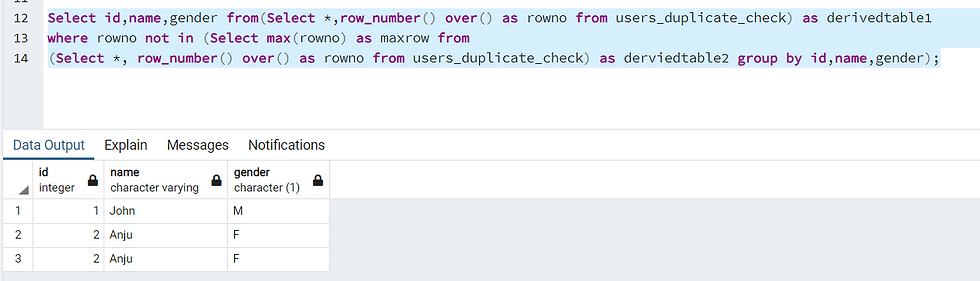
Query Explanation:
Select id,name,gender from(Select *,row_number() over() as rowno from users_duplicate_check) as derivedtable1
where rowno not in ---> Takes rows which are not max rows as duplicates as pass it to main query.
(Select max(rowno) as maxrow from --> Takes the max row from the following inner query
(Select *, row_number() over() as rowno from users_duplicate_check) as derviedtable2 --- >(Executes and apply's row_number for each row of the table).
group by id,name,gender);
-----------------------------------------------------------------------------------------------------------------------------------
2. Given a table 'Vendor_spend, containing vendor spend data. Write a SQL query to show top 50% of vendors are denoted by total_spend.
Create table if not exists vendor_spend(vendor_id int, name varchar, contract_sign_dt date,total_spend int)
Insert into Vendor_spend values
(1,'Beauty_lips','2019-09-01',34012),
(2,'Organic_Veggies','2019-09-10',223433),
(3,'Burger_Madness','2019-10-08',23111),
(4,'Maharaja_Briyani','2019-10-10',23211),
(5,'Jucie_Shop_try','2019-10-28',22012),
(6,'Taste_Natti_Koli','2019-08-22',21121)
Vendor Spend Table

Query :
SELECT * from (Select name, 100* total_spend / (SUM(total_spend) OVER ()) Total_revenue_growth
FROM vendor_spend
group by name,total_spend) as dervied_tabel where Total_revenue_growth >= 50

Query Explanation :
SELECT * from (Select name, 100* total_spend /
(SUM(total_spend) OVER ()) Total_revenue_growth ----> The following window function sums up all the total spend values and this value will be denominator against the total spend. ex:

FROM vendor_spend
group by name,total_spend) as dervied_tabel where Total_revenue_growth >= 50 (The following where condition will get filter the records which is greater the 50%)
-----------------------------------------------------------------------------------------------------------------------------------------
3. The table contains information about the temperature on a certain day.
TBL : Weather

Write an SQL query to find all dates id with higher temperatures compared to its previous day.
Out-Put
2
4
In 2015-01-02, the temperature was higher than the previous day( 10 > 25 )
In 2015-01-04, the temperature was higher than the previous day (20 > 30)
Postgre SQL.
Final Query
Select w1.id,w1.recorddate,w1.temperature,w2.id,w2.recorddate,w2.temperature
from weather_self_join w1 --- previous date
inner join
weather_self_join w2 ---- Current date
on w1.id=w2.id

Query execution step by step
Plain self join query results.

In the second step we are subtracting the current date to -1 from w2 table to get the current date and tally up with w1 previous date.

After this we're trying the apply and condition to compare the current date temperature to previous date. I.E and w2.temperature should be greater than w1.
----------------------------------------------------------------------------------------------------------------------------------------
4. Given the table below 'orders' write a SQL query to show monthly revenue growth. To calculate the monthly revenue growth, apply following logic.
Revenue Growth = (Current months revenue - prior months revenue)/ Prior months revenue
create table if not exists orders
(order_id int,
channel varchar,
order_dt date,
order_month int,
revenue int)
Insert into orders values
(1,'Online','2018-09-01',09,100),
(2,'Online','2018-09-03',09,125),
(3,'In-Store','2018-10-11',10,200),
(4,'In-Store','2018-08-21',08,80),
(5,'Online','2018-08-13',08,200),
(6,'In-Store','2018-09-30',09,100),
(7,'Online','2018-10-10',10,500),
(8,'Online','2018-11-21',11,400)

Postgre-SQL :
select date, growth from (Select
sum(revenue) as revenue, extract(MONTH from order_dt) as date,
100 * (sum(revenue) - lag(sum(revenue), 1) over (order by extract(MONTH from order_dt)))
/ lag(sum(revenue), 1) over (order by extract(MONTH from order_dt)) || '%' as growth
from orders group by extract(MONTH from order_dt)) as derived_table
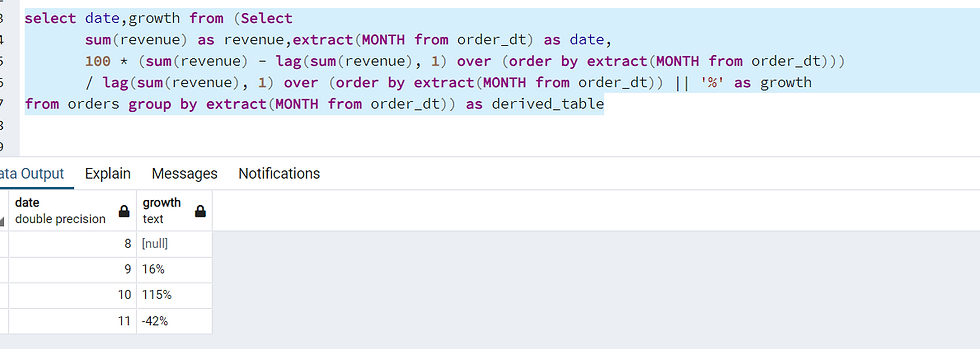
My SQL:
Select order_month, monthly_revenue, lm_revenue,(monthly_revenue-lm_revenue)/lm_revenue as revenue_growth from
(Select order_month, monthly_Revenue, lag(monthly_Revenue) over (order by order_month asc) as lm_revenue from (
Select order_month, sum(revenue) as monthly_revenue from orders group by order_month order by order_month) )
------------------------------------------------------------------------------------------------------------------------------------
Table: Employee
+-------------+------+
| Column Name | Type |
+-------------+------+
| id          | int  |
| salary      | int  |
+-------------+------+
id is the primary key column for this table.
Each row of this table contains information about the salary of an employee.
* Write an SQL query to report the second highest salary from the Employee table. If there is no second highest salary, the query should report null.
The query result format is in the following example.
Example 1:
Input:
Employee table:
+----+--------+
| id | salary |
+----+--------+
| 1  | 100    |
| 2  | 200    |
| 3  | 300    |
+----+--------+
Output:
+---------------------+
| SecondHighestSalary |
+---------------------+
| 200                 |
+---------------------+
Example 2:
Input:
Employee table:
+----+--------+
| id | salary |
+----+--------+
| 1  | 100    |
+----+--------+
Output:
+---------------------+
| SecondHighestSalary |
+---------------------+
| null                |
+---------------------+
Attempt 1 :Select max(salary) from Employee where salary < (Select max(Salary) from employee);
Result : Wrong Answer
Sort the distinct salary in descending order and then utilize the LIMIT clause to get the second highest salary.
SELECT DISTINCT
    Salary AS SecondHighestSalary
FROM
    Employee
ORDER BY Salary DESC LIMIT 1 OFFSET 1
However, this solution will be judged as 'Wrong Answer' if there is no such second highest salary since there might be only one record in this table. To overcome this issue, we can take this as a temp table. MySQL
SELECT
    (SELECT DISTINCT
            Salary
        FROM
            Employee
        ORDER BY Salary DESC LIMIT 1 OFFSET 1) AS SecondHighestSalary
;
Approach: Using IFNULL and LIMIT clause [Accepted]
Another way to solve the 'NULL' problem is to use IFNULL function as below.
MySQL
SELECT IFNULL(
      (SELECT DISTINCT Salary
       FROM Employee
       ORDER BY Salary DESC LIMIT 1 OFFSET 1),
    NULL) AS SecondHighestSalary
Table: Scores
+-------------+---------+
| Column Name | Type |
+-------------+---------+
| id | int |
| score | decimal |
+-------------+---------+
id is the primary key for this table.
Each row of this table contains the score of a game. Score is a floating point value with two decimal places.
Write an SQL query to rank the scores. The ranking should be calculated according to the following rules:
The scores should be ranked from the highest to the lowest.
If there is a tie between two scores, both should have the same ranking.
After a tie, the next ranking number should be the next consecutive integer value. In other words, there should be no holes between ranks.
Return the result table ordered by score in descending order.
The query result format is in the following example.
Answer : select S.Score, Dense_Rank() over(order by S.Score desc) 'Rank' from Scores S
Result Accepted
Table: Weather
+---------------+---------+
| Column Name   | Type    |
+---------------+---------+
| id            | int     |
| recordDate    | date    |
| temperature   | int     |
+---------------+---------+
id is the primary key for this table.
This table contains information about the temperature on a certain day.
Write an SQL query to find all dates' Id with higher temperatures compared to its previous dates (yesterday).
Return the result table in any order.
The query result format is in the following example.
Example 1:
Input:
Weather table:
+----+------------+-------------+
| id | recordDate | temperature |
+----+------------+-------------+
| 1  | 2015-01-01 | 10          |
| 2  | 2015-01-02 | 25          |
| 3  | 2015-01-03 | 20          |
| 4  | 2015-01-04 | 30          |
+----+------------+-------------+
Output:
+----+
| id |
+----+
| 2  |
| 4  |
+----+
Explanation:
In 2015-01-02, the temperature was higher than the previous day (10 -> 25).
In 2015-01-04, the temperature was higher than the previous day (20 -> 30)
Answer : Oracle Select w2.id from weather w1 --- previous_day
join weather w2 --- Current_day
on w2.recordDate - 1 = w1.recorddate
and w2.temperature > w1.temperature
MySQL
SELECT
    weather.id AS 'Id' FROM
    weather
        JOIN
    weather w ON DATEDIFF(weather.recordDate, w.recordDate) = 1AND weather.Temperature > w.Temperature
Question 3 Hard.
Table: Trips
+-------------+----------+
| Column Name | Type     |
+-------------+----------+
| id          | int      |
| client_id   | int      |
| driver_id   | int      |
| city_id     | int      |
| status      | enum     |
| request_at  | date     |
+-------------+----------+
id is the primary key for this table.
The table holds all taxi trips. Each trip has a unique id, while client_id and driver_id are foreign keys to the users_id at the Users table.
Status is an ENUM type of ('completed', 'cancelled_by_driver', 'cancelled_by_client').
Table: Users
+-------------+----------+
| Column Name | Type     |
+-------------+----------+
| users_id    | int      |
| banned      | enum     |
| role        | enum     |
+-------------+----------+
users_id is the primary key for this table.
The table holds all users. Each user has a unique users_id, and role is an ENUM type of ('client', 'driver', 'partner').
banned is an ENUM type of ('Yes', 'No').
The cancellation rate is computed by dividing the number of canceled (by client or driver) requests with unbanned users by the total number of requests with unbanned users on that day.
Write a SQL query to find the cancellation rate of requests with unbanned users (both client and driver must not be banned) each day between "2013-10-01" and "2013-10-03". Round Cancellation Rate to two decimal points.
Return the result table in any order.
The query result format is in the following example.
Example 1:
Input:
Trips table:
+----+-----------+-----------+---------+---------------------+------------+
| id | client_id | driver_id | city_id | status              | request_at |
+----+-----------+-----------+---------+---------------------+------------+
| 1  | 1         | 10        | 1       | completed           | 2013-10-01 |
| 2  | 2         | 11        | 1       | cancelled_by_driver | 2013-10-01 |
| 3  | 3         | 12        | 6       | completed           | 2013-10-01 |
| 4  | 4         | 13        | 6       | cancelled_by_client | 2013-10-01 |
| 5  | 1         | 10        | 1       | completed           | 2013-10-02 |
| 6  | 2         | 11        | 6       | completed           | 2013-10-02 |
| 7  | 3         | 12        | 6       | completed           | 2013-10-02 |
| 8  | 2         | 12        | 12      | completed           | 2013-10-03 |
| 9  | 3         | 10        | 12      | completed           | 2013-10-03 |
| 10 | 4         | 13        | 12      | cancelled_by_driver | 2013-10-03 |
+----+-----------+-----------+---------+---------------------+------------+
Users table:
+----------+--------+--------+
| users_id | banned | role   |
+----------+--------+--------+
| 1        | No     | client |
| 2        | Yes    | client |
| 3        | No     | client |
| 4        | No     | client |
| 10       | No     | driver |
| 11       | No     | driver |
| 12       | No     | driver |
| 13       | No     | driver |
+----------+--------+--------+
Output:
+------------+-------------------+
| Day        | Cancellation Rate |
+------------+-------------------+
| 2013-10-01 | 0.33              |
| 2013-10-02 | 0.00              |
| 2013-10-03 | 0.50              |
+------------+-------------------+
Explanation:
On 2013-10-01:
  - There were 4 requests in total, 2 of which were canceled.
  - However, the request with Id=2 was made by a banned client (User_Id=2), so it is ignored in the calculation.
  - Hence there are 3 unbanned requests in total, 1 of which was canceled.
  - The Cancellation Rate is (1 / 3) = 0.33
On 2013-10-02:
  - There were 3 requests in total, 0 of which were canceled.
  - The request with Id=6 was made by a banned client, so it is ignored.
  - Hence there are 2 unbanned requests in total, 0 of which were canceled.
  - The Cancellation Rate is (0 / 2) = 0.00
On 2013-10-03:
  - There were 3 requests in total, 1 of which was canceled.
  - The request with Id=8 was made by a banned client, so it is ignored.
  - Hence there are 2 unbanned request in total, 1 of which were canceled.
  - The Cancellation Rate is (1 / 2) = 0.50
Answer : SQL Query
/* Write your PL/SQL query statement below */
with data as
(select request_at, status
from trips t
where exists (select 1 from users u
where banned = 'No'
and u.users_id = t.client_id)
and exists (select 1 from users u
where banned = 'No'
and u.users_id = t.driver_id)
and to_date(t.request_at, 'yyyy-mm-dd')
between to_date('2013-10-01', 'yyyy-mm-dd')
and to_date('2013-10-03', 'yyyy-mm-dd')),
total_requests as
(select request_at, count(1) as no_of_requests
from data
group by request_at),
total_cancels as
(select request_at, count(1) as no_of_cancels
from data
where status in ('cancelled_by_driver', 'cancelled_by_client')
group by request_at)
select tr.request_at as "Day"
, round(coalesce(tc.no_of_cancels, 0) / tr.no_of_requests, 2) as "Cancellation Rate"
from total_requests tr
left join total_cancels tc on tr.request_at = tc.request_at;
Question : 4
SQL Schema
Table: Person

id is the primary key column for this table. Each row of this table contains an email. The emails will not contain uppercase letters. Write an SQL query to delete all the duplicate emails, keeping only one unique email with the smallest id. Return the result table in any order. The query result format is in the following example. Example 1:

Answer :
Delete p1 from person p1, person p2
where p1.email=p2.email and p1.id > p2.id
Question 4
Table: Department

Write an SQL query to reformat the table such that there is a department id column and a revenue column for each month.
Return the result table in any order.
The query result format is in the following example.
Example 1:

Answer : Oracle
Select * from
(Select id, revenue, month from department)
pivot
(sum(revenue)
for month in ('Jan' as Jan_Revenue,'Feb' as Feb_Revenue,'Mar' as Mar_Revenue,
'Apr' as Apr_Revenue,'May' as May_Revenue,'Jun' as Jun_Revenue,
'Jul' as Jul_Revenue,'Aug' as Aug_Revenue,'Sep' as Sep_Revenue,
'Oct' as Oct_Revenue,'Nov' as Nov_Revenue,'Dec' as Dec_Revenue)
)
Answer : My SQL
Select id,
sum(case when month = 'Jan' then revenue else null end) as Jan_Revenue,
sum(case when month = 'Feb' then revenue else null end) as Feb_Revenue,
sum(case when month = 'Mar' then revenue else null end) as Mar_Revenue,
sum(case when month = 'Apr' then revenue else null end) as Apr_Revenue,
sum(case when month = 'May' then revenue else null end) as May_Revenue,
sum(case when month = 'Jun' then revenue else null end) as Jun_Revenue,
sum(case when month = 'Jul' then revenue else null end) as Jul_Revenue,
sum(case when month = 'Aug' then revenue else null end) as Aug_Revenue,
sum(case when month = 'Sep' then revenue else null end) as Sep_Revenue,
sum(case when month = 'Oct' then revenue else null end) as Oct_Revenue,
sum(case when month = 'Nov' then revenue else null end) as Nov_Revenue,
sum(case when month = 'Dec' then revenue else null end) as Dec_Revenue
from department
group by id
* The following Rank functions are available in SQL.
ROW_NUMBER()
RANK()
DENSE_RANK()
NTILE()
In the SQL RANK functions, we use the OVER() clause to define a set of rows in the result set. We can also use SQL PARTITION BY clause to define a subset of data in a partition. You can also use Order by clause to sort the results in a descending or ascending order.
ROW_NUMBER()
We use ROW_Number() SQL RANK function to get a unique sequential number for each row in the specified data. It gives the rank one for the first row and then increments the value by one for each row. We get different ranks for the row having similar values as well.

-----------------------------------------------------------------------------------------------------------------------------------------
* FAANG : Five most popular and best-performing American technology companies. Meta (formerly known as Facebook), Amazon, Apple, Netflix, and Alphabet (formerly known as Google)
Q) We want to generate an inventory age report which would show the distribution of remaining inventory across the length of time the inventory has been sitting at the warehouse. We are trying to classify the inventory on hand across the below 4 buckets to denote the time the inventory has been lying the warehouse.
0-90 days old
91-180 days old
181-270 days old
271 – 365 days old
For example, the warehouse received 100 units yesterday and shipped 30 units today, then there are 70 units which are a day old.
The warehouses use FIFO (first in first out) approach to manage inventory, i.e., the inventory that comes first will be sent out first.
For example, on 20th May 2019, 250 units were inbounded into the FC. On 22nd May 2019, 8 units were shipped out (outbound) from the FC, reducing inventory on hand to 242 units. On 31st December, 120 units were further inbounded into the FC increasing the inventory on hand from 242 to 362.On 29th January 2020, 27 units were shipped out reducing the inventory on hand to 335 units.
On 29th January, of the 335 units on hands, 120 units were 0-90 days old (29 days old) and 215 units were 181-270 days old (254 days old).
Columns:
ID of the log entry
OnHandQuantity: Quantity in warehouse after an event
OnHandQuantityDelta: Change in on-hand quantity due to an event
event_type: Inbound – inventory being brought into the warehouse; Outbound – inventory being sent out of warehouse
event_datetime: date- time of event
The data is sorted with latest entry at top.
Sample output:
-----------------------------------------------------------------------------------------------------------------------------------------
WITH WH as
(select * from warehouse order by event_datetime desc),
days as
(select event_datetime, onhandquantity
, (event_datetime - interval '90 DAY') as day90
, (event_datetime - interval '180 DAY') as day180
, (event_datetime - interval '270 DAY') as day270
, (event_datetime - interval '365 DAY') as day365
from warehouse limit 1),
inv_90_days as
(select coalesce(sum(WH.OnHandQuantityDelta), 0) as DaysOld_90 /* Get the total InBound inventories in the last 90 days */
from WH cross join days
where WH.event_datetime >= days.day90
and event_type = 'InBound'),
Select * from inv_90_days
inv_90_days_final as
(select case when DaysOld_90 > onhandquantity then onhandquantity /* If InBound inventories is greater than curent total inventories then curent total inventories is the remaining inventories */
else DaysOld_90
end as DaysOld_90
from inv_90_days x
cross join days),
inv_180_days as
(select coalesce(sum(WH.OnHandQuantityDelta), 0) as DaysOld_180 /* Get the total InBound inventories between the last 90 and 180 days */
from WH cross join days
where WH.event_datetime between days.day180 and days.day90
and event_type = 'InBound'),
inv_180_days_final as
(select case when DaysOld_180 > (onhandquantity - DaysOld_90) then (onhandquantity - DaysOld_90)
else DaysOld_180
end as DaysOld_180
from inv_180_days x
cross join days
cross join inv_90_days_final),
inv_270_days as
(select coalesce(sum(WH.OnHandQuantityDelta), 0) as DaysOld_270 /* Get the total InBound inventories between the last 180 and 270 days */
from WH cross join days
where WH.event_datetime between days.day270 and days.day180
and event_type = 'InBound'),
inv_270_days_final as
(select case when DaysOld_270 > (onhandquantity - (DaysOld_90 + DaysOld_180)) then (onhandquantity - (DaysOld_90 + DaysOld_180))
else DaysOld_270
end as DaysOld_270
from inv_270_days x
cross join days
cross join inv_90_days_final
cross join inv_180_days_final),
inv_365_days as
(select coalesce(sum(WH.OnHandQuantityDelta), 0) as DaysOld_365 /* Get the total InBound inventories between the last 270 and 365 days */
from WH cross join days
where WH.event_datetime between days.day365 and days.day270
and event_type = 'InBound'),
inv_365_days_final as
(select case when DaysOld_365 > (onhandquantity - (DaysOld_90 + DaysOld_180 + DaysOld_270)) then (onhandquantity - (DaysOld_90 + DaysOld_180 + DaysOld_270))
else DaysOld_365
end as DaysOld_365
from inv_365_days x
cross join days
cross join inv_90_days_final
cross join inv_180_days_final
cross join inv_270_days_final)
select DaysOld_90 as "0-90 days old"
, DaysOld_180 as "91-180 days old"
, DaysOld_270 as "181-270 days old"
, DaysOld_365 as "271-365 days old"
from inv_90_days_final
cross join inv_180_days_final
cross join inv_270_days_final
cross join inv_365_days_final
cross join days;
3. Suppose your team interviews undergraduate candidates across many different colleges. You are looking to check which candidates scored the highest from each college.
Write a SQL query to show which candidates scored highest from each college.
Create table if not exists Colleges(college_id int,
candidate_name varchar)
Insert into colleges values
(1234,'John'),
(1234,'Sarah'),
(12345,'Tim Cook'),
(12345,'Lisa'),
(12345,'Jenny')
Create table if not exists Interviews(interview_id int, candidate_name varchar, score int)
Insert into Interviews values
(12,'John',4),
(22,'Sarah',3),
(23,'Tim Cook',3),
(24,'Lisa',5),
(26,'Jenny',2)
* Colleges Table

* Interviews Table

Post-gre SQL Query:
Select * from (Select c.candidate_name,
college_id,i.score,
rank() over(partition by college_id order by i.score desc) as rnk
from colleges c left join interviews i on c.candidate_name=i.candidate_name) as derviedtable
where rnk = 1
SQL IMPORTANT POINTS :
SQL assumes that if you divide an integer by an integer, you want to get an integer back.
This means that the following will erroneously result in 400.0:
SELECT 45 / 10 * 100.0;
This is because 45 / 10 evaluates to an integer (4), and not a decimal number like we would expect.
So when you're dividing make sure at least one of your numbers has a decimal place:
SELECT 45 * 100.0 / 10;
The above now gives the correct answer of 450.0 since the numerator (45 * 100.0) of the division is now a decimal!
VIEWS
1. View is a database object.
2. View is created over and SQL query
3. View does not store any data.
Syntax
Create a view order_summary
as
Select o.ord_id, o.date, p.product_name, c.cust_name, (p.price * o.quantity) - ((p.price * o.quantity) * disc_percent::float/100) as cost from customer_data c
join tb_order_Details o on o.cust_id = c.cust_id
join tb_product_info p on p.prod_id=o.prod_id;
* Create or replace view order_summary
as
Select o.ord_id, o.date, p.product_name, c.cust_name, (p.price * o.quantity) - ((p.price * o.quantity) * disc_percent::float/100) as cost from customer_data c
join tb_order_Details o on o.cust_id = c.cust_id
join tb_product_info p on p.prod_id=o.prod_id;
When using replace column name should not be aliased and data type should not be changed.



Comments